Wednesday, July 28, 2021

Published July 28, 2021 by Anonymous with 0 comment

Creating Engaging Content for Your App – 5 Tips

By Jessica Fender – Many app developers dream of coming up with the next Angry Birds or Candy Crush. Others dream of developing a personal development/lifestyle-related app that will beat out all the competition because it is so unique. Still, others simply want todevelop an app for their business, so that customers have the convenience of using it on their mobile devices. After all, the use of mobile devices has outpaced PC use for a number of years now.

As of the first quarter of 2021, there were a total of 5.6 million apps on the Apple Store and Google Play combined. It seems that the adage, “there’s an app for that” is really true.

With all of these options for consumers, it’s no surprise that a huge number of apps simply sit out there and die a slow death. This may be the result of several factors – lack of strong marketing, too repetitious of other apps that came out earlier, etc.

One factor that may not be receiving enough attention from app developers/owners is content. Yet, it is the one thing that can set your app apart and give your users an experience they will not have with your competition. When your content can genuinely engage your app user, you will have a winner. And your users will not only keep your app, but they will also share it with others – they become “marketers” for you.

Just What is Engaging Content?

Journalists and successful bloggers can probably define this for us. They understand what it takes to capture the reader’s attention and hold it. It is the crafting of text and visuals that immediately capture attention, from the headline on, and that provide valuable education, entertainment, or inspiration to those who access it.

So, how does this translate to app content? Read on for five tips to craft your engaging content for your app.

5 Tips

Know The Audience and Target Members Personally

All content should be written with the target audience in mind. It’s not about what you want to say. It’s about what that audience wants to hear. Your content must demonstrate that you understand their needs and problems and that you can provide the solutions they are looking for.

Let’s take a simple example. All airlines have an app. If a person downloads the app of an airline they frequently use, they can of course book their flights and get flight information. However, when there are delays, gate changes, or other incidents, each customer receives a targeted personal message regarding his flight. Content like this endears app users and serves their needs, not those of the company. Pushing out generic messages to all users is not good content and becomes irritating.

If a potential customer has added an item to their cart and then never purchased, what content can you push to them to encourage finishing the purchase? This speaks to relationship building through your content.

The questions you need to ask yourself here are who is going to use your app, what are looking to get from using it, and how will this app provide that? The additional question is how can you personalize the content they access and receive?

Honor the Screens and Users of Mobile Devices

Mobile devices surpassed PC use several years ago. If you developed a web app for PC use, the content cannot simply be moved over for mobile screens and users.

First, mobile users will not tolerate walls of text – the screens are too small, and users are often “on the go.” They want their content delivered in ways that can be quickly absorbed. Use more visuals than text; use video; and anything in print must be large.

Remember, today’s consumer has a very short attention span (some research says about 8 seconds). If you have not caught their attention within that time, they will go to your competition.

Read: 7 Must Have Social Media Tools In 2021 

Promote Your App Content Via Social Media

While this is an obvious marketing tool, it should not seem like one to a social media user.

Consider this: there are almost 4 billion people on social media, and the average person has 8 accounts.

When you can transfer some of your app content to your social media platforms to engage your target audiences, you can generate more interest in it. Here are just two things you can do:

  • Create trailers or teasers to show potential users what your app does and how it provides value to them.
  • Offer incentives to download and share posts about your app – this can be a free trial or a temporary free upgrade.

If you struggle with integrating social media posts with your app content (and this can be a bit tricky), check out Edubirdie, a professional online writing service. They have a large department of creative writers with experience crafting social media posts and managing social media platforms for businesses. Let one of their pros take a look at your app and create great copywriting content for your platforms.

Read: 8 Types of visual aids to use in your marketing strategy

Use Visual Storytelling

This is especially important for a mobile app. First, let’s define visual storytelling as a content medium. It is not a lengthy tale by any means.

You have seen short story snippets in advertising – Flo and team from Progressive Insurance, the Geico Gecko, the Charmin bears. How can you use this concept in your app content?

  1. Begin with a great icon that is easily recognizable and one that can tell a brief visual story of what your app is all about. Here is an example from Soundcloud:
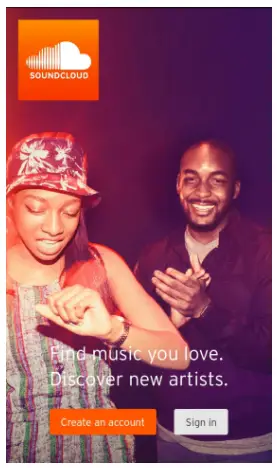
Soundcloud app

Your app will be easily recognizable on anyone’s screen. And the story? Two people enjoying the music they have found.

  1. Moving on to the actual app content, how can you tell short visual stories as users experience all that it can do for them?

One of the best examples of this is the now-discontinued weather app, Poncho. Launched in 2013, this was probably the most popular weather app, until its demise after being bought from its funders by Dirty Lemon, a company that only wanted the technology behind it. Poncho provided weather forecasts that were personalized based upon user input, but he did far more than that. He chatted with his users; he had his own “life,” captured in visuals.
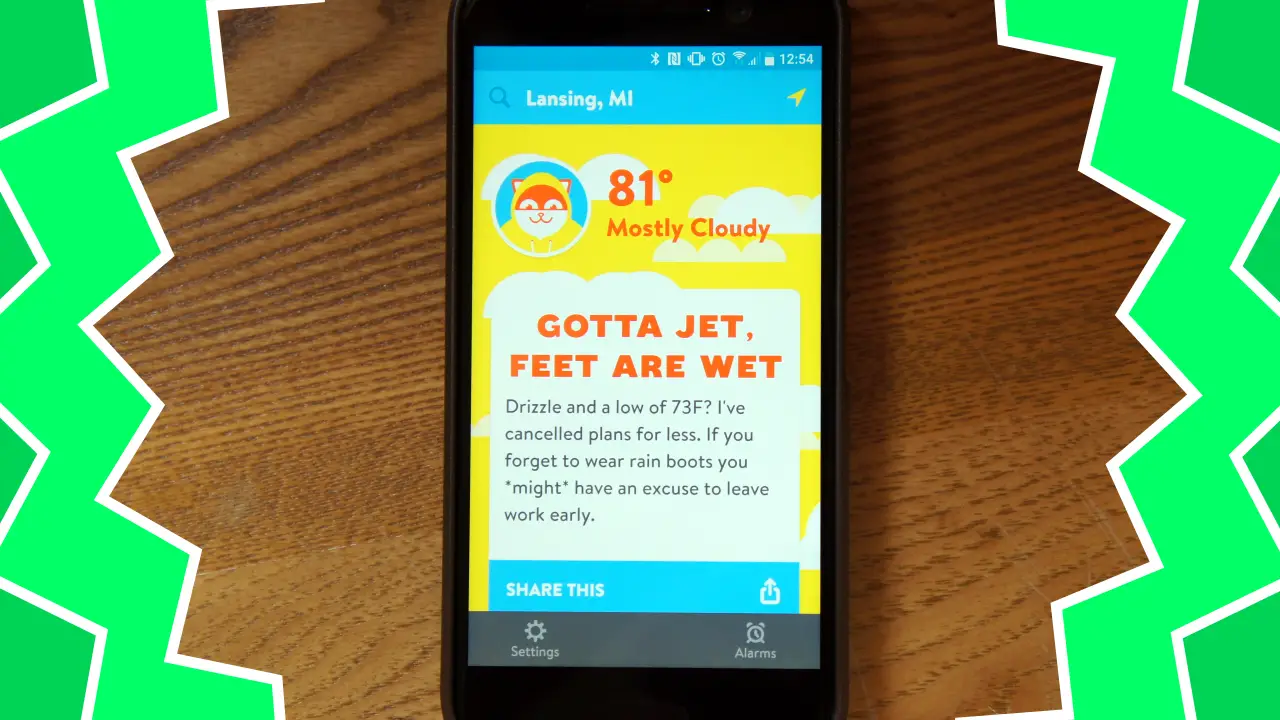
Ultimately, Poncho expanded to offer more, such as daily horoscopes pushed out to users who provided their zodiac signs and wake-up alarms. Each of these features sported Poncho with a short visual “story.”

Use In-App Feedback to Get Better

Once someone has experienced your app, one piece of your content needs to ask for feedback on that experience. It will provide invaluable information on how you can improve. While it may be a simple feedback survey, it can also simply ask for users’ opinions, which they can freely express. This is the best method to measure user satisfaction/unhappiness.

When ModCloth, a highly popular women’s clothier, launched its app, the results were not wonderful. Fortunately, it had in-app feedback technology to tell them this. Here’s an example:


Love ModCloth Hate the app

It’s a painful app that makes for a painful shopping experience. The apps search features doesn’t look so you can’t look up items. On top of that you can’t bring down the side menu to shop by clearance or to choose a category. So if the item you want to purchase is not accessible by one of the promotions on the front page then you are out of luck. There is no way to then access that item even if you saw it in an ad.

So when your whole order you spent time sizing and fitting to yourself gets deleted out of your cart once you log in you feel a deep sense of dread knowing you probably won’t find most those items again. I got lucky and only missed out on a couple items before I finally made my purchase out of fear my items would delete again. ( and my original order was close to 300$ now I was placing an order for 180$)

Now you might think that is bad but what makes it worse is the fact the same problems are on the mobile site too. Which makes it hard to navigate around this problem unless you are on a pc. ModCloth is a great fashion brand that I grew up loving. But they are loosing money by not having intuitive functioning app and mobile sites. I will still by from them but it’s no longer convenient and easy to purchase which means I am more likely to by from other brands unless I have time to shop on my laptop.

Developer Response,

Hi, there. Thank you for reaching out. I’m very sorry for any shopping inconvenience. Our team is aware of the current search and menu issues, and they are working on a fix, as we speak. We hope to have this resolved very soon!

You can respond to the feedback and assure users that you are doing what you can to fix their dis-satisfaction.

Wrapping It All Up

Are these tips all that you need to create amazing app content that will have your users thrilled? No, not at all. But these five tips are a start point. Work with these, check out how your competitors are making use of the content, and keep refining your app based upon what your users say.

Jessica Fender is a copywriter and blogger at Writeload with a background in marketing and sales. She enjoys sharing her experience with like-minded professionals who aim to provide customers with high-quality services.


If you like the content, we would appreciate your support by buying us a coffee. Thank you so much for your visit and support.

Adblock test (Why?)


Original page link

Best Cool Tech Gadgets

Top favorite technology gadgets

Read More
      edit
Published July 28, 2021 by Anonymous with 0 comment

Boost Your Mac’s Productivity and Get the Most Out of It

When we are working on a computer, we want to do more in less time, and there are a lot of ways that boost our productivity. Whether you are using macOS or Windows, there’s usually something new to learn to make our work easier. If you are a Macuser, you can use these tips for quick performance.

Stack All Desktop Items

A desktop is a place that tells a lot about your personality, so try to keep it as organized as possible. People usually use the desktop as a place to dump their files, folders, images, and multimedia items, since it’s easy to find everything instantly. You can organize your files and other items using Stacks.

Click anywhere on the blank area on the desktop, open the View menu, and select Use Stacks to Organize files in groups. You can stack an item by kind, last opened date, added date, modified date, created date, or by tags. Now, whenever you add a file, folder, image, etc., to the desktop, it will be added to the appropriate stack.

Read: How to install Ubuntu on a MAC using a virtual box

Take Notes on MacBook

If you are using an iPhone, iOS, iPod touch, MacBook Pro, MacBook Air, or Mac, you must be well acquainted with the popular Notes app. You can keep your long-form drafts, grocery lists, ideas, and other things that come to your mind comprehensively in one single place through macbook note taking. It is a brilliant and powerful tool as the moment it syncs with iCloud, all of the Notes will be accessible across devices.

So, if you have to jot down something valuable on your MacBook and you need it urgently while on the go, you can access the notes on your iPhone or iPad. So, you don’t have to email or AirDrop your new notes, as you can access them using one of your Apple devices.

Save Your Searches

With macOS, you don’t have to dig into your search history over and over again to find the right search. You can save your searches in Smart Folders, which are the virtual folders with updated web searches in them. You can create these folders by specifying the criteria for the items that you want to save into that particular folder.

Read: Top Chrome extensions to improve productivity

For creating a Smart Folder, launch Finder:

  1. Click New Smart Folder, select the criteria by setting up the first rule or adding new rules.
  2. Click on the Save button and enter a name for the Smart Folder.
  3. Save the folder at the desired location on the computer.

If you don’t want the Smart Folder to appear in the Sidebar, deselect the checkbox available with Add to Sidebar.

Learn About the Shortcuts

Shortcuts can make a significant difference to the way you work and can result in improved efficiency. Pressing down certain key combinations can give you the desired outcome but in a quick manner. Command + W allows you to close the Finder window or a browser tab, while Option + Command + Escape will enable you to force quit an open application.

What’s more exciting is that you can also create your own set of keyboard shortcuts. However, Mac only allows you to create keyboard shortcuts for existing menu commands while you cannot create shortcuts for general tasks such as closing or opening an app. If you wish to remove any of the custom keyboard shortcuts, select the shortcut and click the Delete (minus) button.

Undo a Recent Typo

Typos are common but annoying at the same, particularly when you are typing something on your iPhone or iPad. In the absence of a virtual keyboard, it’s difficult to correct and undo the last typing action. There’s no efficient ‘Undo’ icon available on the iPhone, but Apple offers something unique that enables you to undo the typos quickly.

Read: Internet Monitoring Software Helps to Increase Employee Productivity

Apple’s Shake to Undo feature allows iPhone users to correct their typos. On typing an incorrect text, users can shake their iPhone to initiate the undo typing action feature. It is activated by default; however, you can access it by navigating to Settings, then General, next Accessibility, and then Shake to Undo.

Scan a Document & Sign It

Efficient document and file management is important. The Notes app in the macOS includes a built-in scanner feature that allows users to scan a document simply and efficiently. You can also edit, crop, sign, or annotate an item digitally using the Markup tool in Notes. When it comes to annotating a file, you can also use Photos or Preview apps on your macOS.

To scan a document, start a new note, click the camera icon available in the button-center, and click Scan Documents. The app will automatically adjust the scanner or instruct you to align the document for a proper scan. The built-in scan option makes it easier to share a document quickly with friends when required.


If you like the content, we would appreciate your support by buying us a coffee. Thank you so much for your visit and support.

Adblock test (Why?)


Original page link

Best Cool Tech Gadgets

Top favorite technology gadgets

Read More
      edit

Wednesday, July 21, 2021

Published July 21, 2021 by Anonymous with 0 comment

How to Make a Windows App: a brief guide

By Stacey Wonder – Today, any developer has the right to add his unique application to the Windows store for sale or make it especially for himself and share it with friends.A native application can simplify business organization and be beneficial to the user experience. Whatever its purpose, it will become profitable.

Let’s take a look at how to create a Windows application, and what needs to be considered during its development.

Why do you need a Windows application

A Windows application is essential for the daily life of the user. It is a robust and powerful tool that handles a large number of clipboard requests. It must be available online and offline, and be able to work quickly and without interruption. For creation, platform-dependent programming is used, which increases productivity and user experience.

By Windows rules, you, as a developer, get 70% of all app sales. If the total amount exceeds $ 25,000, the percentage will increase to 80.

Read: How to speed up your Windows computer

The first steps

To develop a Windows application, you need to do the following:

  1. Assess competitors’ market, think over a strategy and find tools.
  2. Register as a developer and create an account.
  3. Download the necessary tools – Visual Studio, SDK Bings Maps, Windows Azure mobile services, etc. You can select them based on personal preferences and the purpose of the application itself.
  4. Launch Visual Studio and apply for a free developer license.
  5. Choose a programming language for development. For example JavaScript with HTML / CSS, C #, Visual Basic or C ++ with XAML, C ++ with DirectX.

Every step of application development must be planned. You initially need to choose those qualities in which the product will be better than existing on the market.

CRM / ERP development

CRM and ERP should be implemented to get user feedback, increase profit and productivity of the application.

CRM is a system aimed at managing customer interactions by collecting data. With its help, it is easy to predict the success of the application, and correctly assess the needs of customers. It is easy to monitor performance from anywhere in the world, since they are available through the public network.

ERP is a resource planning program that is required for the success of an application. It finds all errors in the system and helps to fix them.

Read: Best Free Graphic Design software for Linux

UI / UX design

The right user interface is the foundation of a successful user experience. It should be fast, convenient, intuitive, functional, attractive and not monotonous. Otherwise, you risk losing a potential client forever.

The possibilities of UI and UX design today are endless. To begin with, you should evaluate the market of competitors and understand what users want to see, as well as consult with designers who will help to translate your ideas to the benefit of the client.

Conclusion

Despite the abundance of Windows applications in the market, the development of new ones will remain relevant in the coming years. They help drive a company’s bottom line and improve customer engagement. To develop an optimal application, you need to think through a strategy and choose convenient tools. We have included some of them to make it easier for you to create a unique product. Use other guides to make it easier, better, and easier to develop your Windows application.

Stacy Wonder – staceywonder.cw[@]gmail.com


If you like the content, we would appreciate your support by buying us a coffee. Thank you so much for your visit and support.

Adblock test (Why?)


Original page link

Best Cool Tech Gadgets

Top favorite technology gadgets
Read More
      edit
Published July 21, 2021 by Anonymous with 0 comment

Best iPhone Data Recovery 2021: Paid and Free Recovery Solutions

Data recovery is the process by which deleted files can be restored to the device. If you accidentally delete an important document or image, don’t worry because there is the option of recovering it before it is lost forever.

In this article, we are looking at some of the best iPhone data recovery software that you can use in 2021.

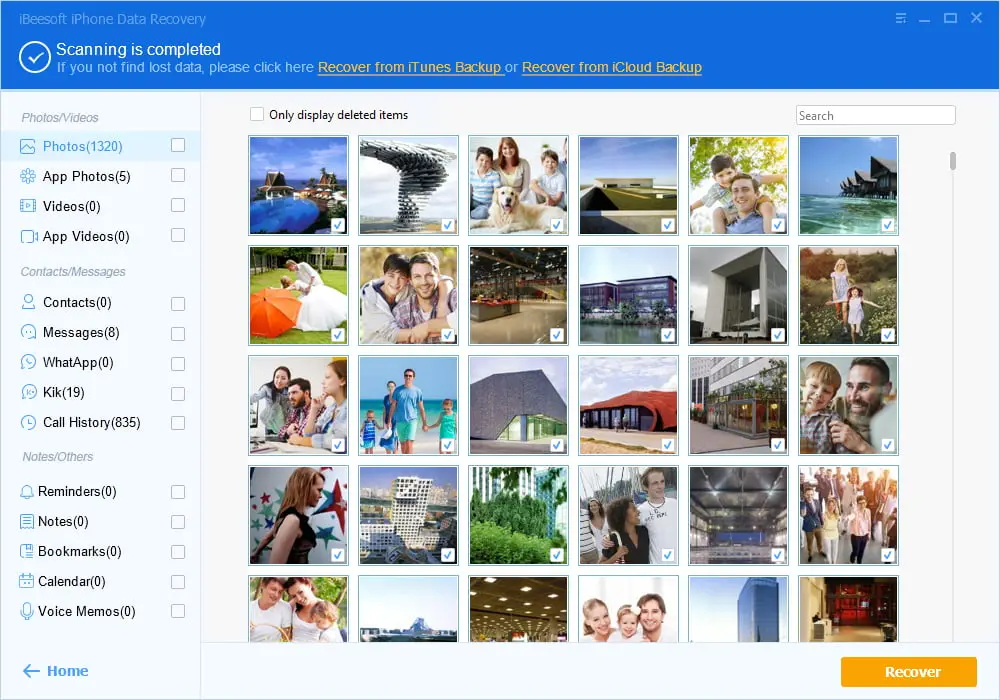
iBeesoft iPhone Data Recovery (Trust Score 4.7 by 579 Users) An all-in-one iOS data recovery software free download to recover lost data from iPhone, iPad and iPod touch, iTunes and iCloud backup files, making it the almighty iPhone data recovery solution.

iBeesoft iPhone Data Recovery covers a variety of different scenarios that can cause your data to get deleted such as Accidental Deletion, System Crashes, Virus Attacks, Jailbreak, and so on.

The file types that you can restore using this software include Images, Contacts, Text Messages, Call History, WhatsApp Messages, and Notes.

The iBeesoft iPhone Data Recovery software can work with both Windows and iOS.

www.ibeesoft.com

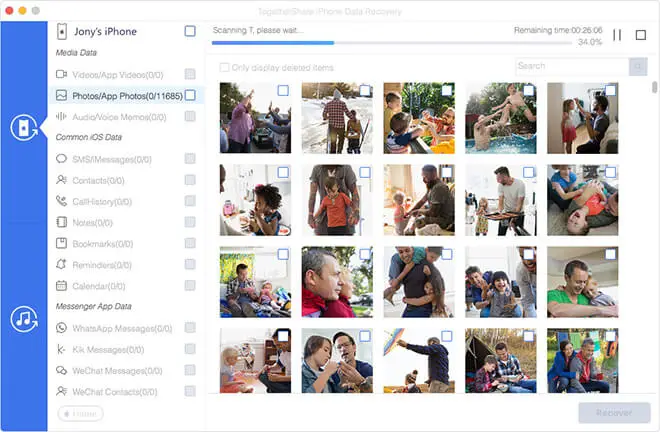
Togethershare iPhone Data Recovery is the first paid software on our list. The software charges a one-time fee – which means that you don’t have to worry about paying subscription charges or any other sort of compensation once you are done with the initial purchase.

Read: Five best open source Backup utilities for Linux

Togethershare covers a range of different iOS devices from iPod Touch to iPhone 11/11 Pro/Pro Max. With Togethershare, you can recover a variety of different file types including Voice Memos, Contacts, Call History, Images, and Messages etcetera.

Togethershare is easy-to-use and involves just three steps using which you can recover your data. It is safe to use, and you can continue getting free updates once you have initially purchased it.

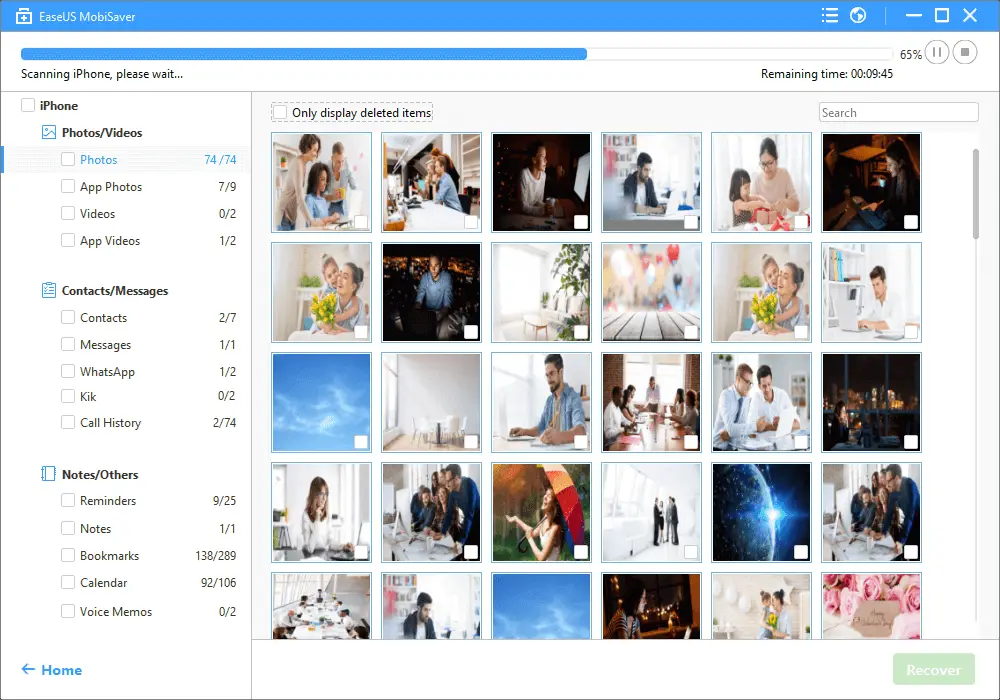
EaseUS Mobisaver comes with the best of both worlds – it is a paid as well as free software that you can use to recover your lost data on an iOS device. The free version comes with certain restrictions while the paid version gives you much more choice and freedom.

EaseUS Mobisaver works with iPhones, iPads, and iPod Touch. With iPhones, the compatibility goes as far as iPhone 11/11 Pro.

There are three recovery modes that you can utilize with the EaseUS software. You can opt to recover from an iOS device, from iTunes, or from the iCloud backup. Like iBeesoft, EaseUS also covers different scenarios and incidents that can cause data to be lost. These include Accidental Deletion, Virus Attacks, and Lost/Stolen etcetera.

Tenorshare UltData also comes in paid and free versions. The paid version comes with the option of a monthly subscription, yearly subscription, and lifetime purchase. Tenorshare UltData features three different modes of data recovery which include iOS Device Data recovery, iTunes Data recovery, and iCloud backup recovery.

Tenorshare UltData is compatible with the latest iPhone model as well as all models of iPad Air, iPad Mini, and iPad Pro. From iPhone 12 Pro Max to iPhone 4, you can use this software on any device you want.

With Tenorshare UltData, you can recover more than 35 different file types which include SMS, Contacts, and Images etcetera.

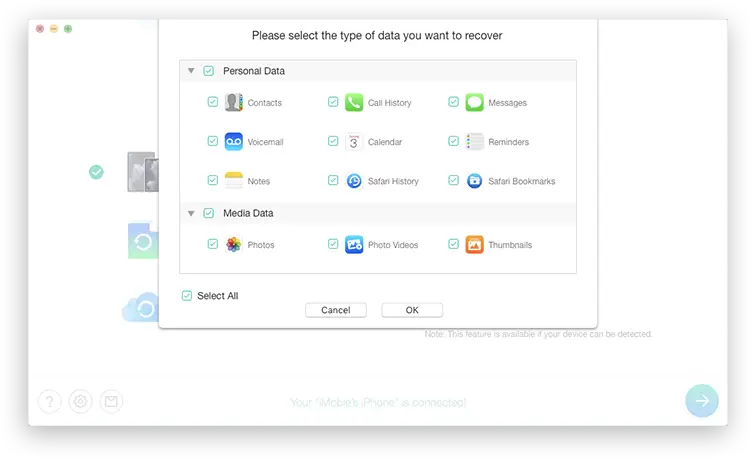
iMobie PhoneRescue is a free software that you can use for iPhone data recovery. The salient features of this software include its Android + iPhone compatibility, support for up to 31 file types, 100% Secure operation, and easy-to-use procedure.

If you are looking to get a data recovery software without spending some extra bucks, go for iMobie PhoneRescue. This software has saved the data of over 5,700,000 users to date. Whether it is text messages that you are looking to recover or lost images, iMobie PhoneRescue gives you the solutions you need.

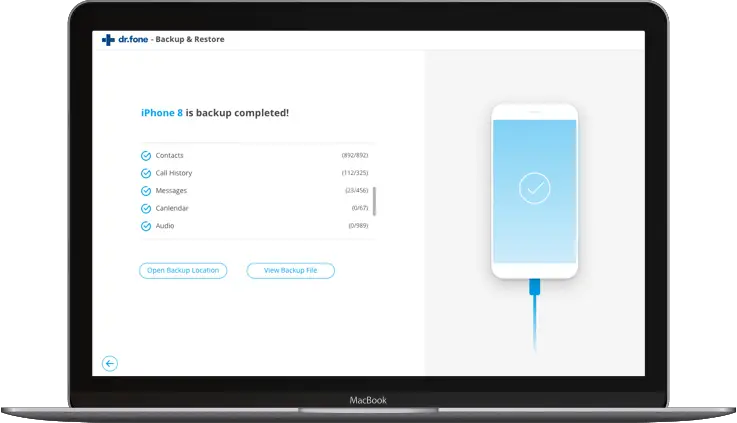
Dr. Fone is yet another free software that you can download free of charge. The thing that sets Dr. Fone apart from other software is the wide range of tools that it makes available to its users. For example, Dr. Fone gives the option of transferring Whatsapp chats between iOS and Android.

Similarly, it offers solutions for locked iPhone Apple IDs and stuck locked screens. If you are facing issues other than lost data, you may find the solutions you need at Dr. Fone.

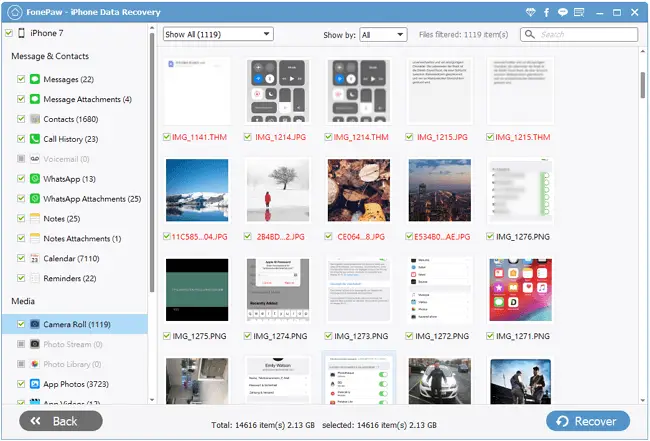
Fonepaw is a paid software that you can use to recover lost data files on your iPhone. Fonepaw has, in addition to the data recovery software, several other products that help enhance the experience of iMac and Android users.

Among other products that you can enjoy from Fonepaw, the iMac Data Recovery, Android Data Recovery, and Screen Recorder are some of the main ones.

Read: How to transfer photos and videos from iPhone to Mac and Windows

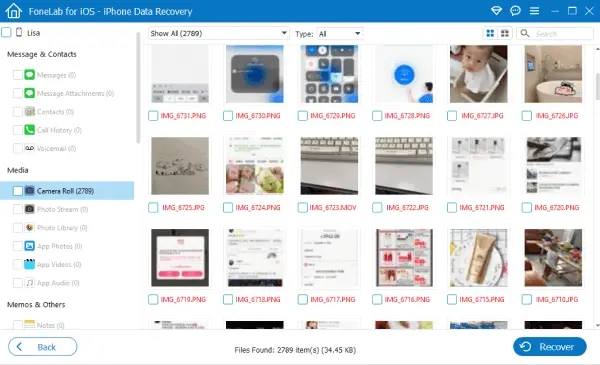
FoneLab lets you recover deleted data from iPads, iPhones, and iPod Touch. Like other recovery tools in the market, FoneLabd gives you the option of three different recovery modes e.g. iOS device recovery, iTunes recovery, and iCloud Backup recovery. There are different file types that you can restore such as Text Messages, Memos and Contacts etcetera.

FoneLab lets you scan and preview the lost data before recovering it. This lets you make sure that you are recovering the right files. FoneLab is a paid software with a one-time fee.

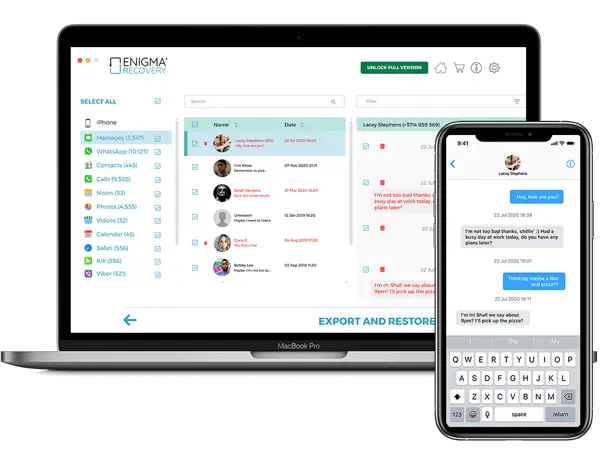
Enigma Recovery is a paid software that can be downloaded free of charge. The free version lets you preview the lost data. But, if you want to restore the lost files after seeing them, you need to buy a year-long subscription. There are three different packages that you can choose from. The Personal bundle lets you recover from 1 device only, while the Multi package allows up to 3 devices. The Professional subscription lets you recover from 10 devices together.

With Enigma Recovery, you can restore calls, messages and notes etcetera to your iOS device.

Primo iPhone Data Recovery is a paid software that lets you recover data from your iPhone, iPad, and iPod Touch. This software allows you to use any of the three modes for recovery which include iTunes recovery, iOS device recovery, and iCloud recovery.

You can restore up to 25 different types of files including contacts, messages, and notes etcetera. Primo iPhone Data Recovery comes with two different packages that you can buy which include the Personal License and the Family License. The former allows 1 PC while the latter gives access to 5 Macs and PCs simultaneously.

Read: How to Choose a Ringtone Maker For iPhone (+List)

Conclusion

If you are looking to get data recovery software for your iPhone, there are numerous paid and free options that you can consider. In the above article, we have looked at some of the best paid and free software that you can buy in 2021.


If you like the content, we would appreciate your support by buying us a coffee. Thank you so much for your visit and support.

Adblock test (Why?)


Original page link

Best Cool Tech Gadgets

Top favorite technology gadgets
Read More
      edit
Published July 21, 2021 by Anonymous with 0 comment

Steps of Blockchain – The Future of SSL Certificates

NOTE: The actual contents and opinions are the sole views of the author who maintains editorial independence.
Companies are continuously moving their activities online. It helps them reach out to a more significant part of their audience and leads to a higher conversion rate. However, the internet comes with severe risks. Hackers are always on the prowl and
searching for vulnerabilities in your networks. Therefore, it becomes essential to protect your customer data and other information on your servers.

The need for having a robust cybersecurity apparatus is immense in the cryptocurrency industry as cyberattacks have plagued it.

Annual costs due to cybercrimes are expected to reach US$ 6 trillion globally in 2021. As a result, it has become essential to buy SSL certificates, but can these certificates thwart data breaches in the future? We will discuss how Blockchain technology can be the future of these certificates.

Why are SSL Certificates Important in the Crypto space?

Businesses that utilize their website for online transactions must install an SSL certificate. It will help safeguard the customer data and ensure that the transactions take place over a secure communication channel.

The certificate will ensure that the communication exchange between the web server and the visitor’s browser is encrypted. It can only be read by the designated recipient and is not accessible by any unauthorized third party.

It is necessary to buy SSL certificate if you wish to undertake online transactions through your website. Apart from the padlock that acts as a trust factor, your website is authenticated by a reputed third-party Certificate Authority (CA). The incumbent data in your servers is kept confidential while ensuring the integrity of the data too.

Read: HTTP or HTTPS: What is the Difference and Which One is Better to Use

The Future of SSL Certificates

With cryptocurrency gaining in prominence rapidly, it has been the target of hackers. In a significant attack at one of the world’s biggest cryptocurrency exchanges – Binance, hackers stole an equivalent of US$ 40 million along with API tokens and two-factor authentication codes. In addition, online theft has been a problem, with the crypto industry stealing around US$ 1.9 billion in 2020.

In the Binance incident, there were rumors that the hackers mirrored the URL of the Binance exchange site. The users who were fraudulently led to the malicious site lost their assets. The exchange stored the data in the blockchain using SSL encryption technology. Crypto exchanges must have the highest form of security to prevent malpractices.

What is Blockchain?

Blockchain, often referred to as DLT (or Distributed Ledger Technology), ensures that the digital asset cannot be altered and is transparent using adequate decentralization techniques and cryptographic hashing. It is a digital ledger of transactions that are duplicated and distributed across a chain of computers situated on the blockchain. There is a transparent ledger that ensures the data integrity is preserved.

The technology aids by removing fraud and mitigating risks in data integrity through a scalable and transparent method. Transactions are recorded through an unalterable cryptographic hash signature. It will essentially mean that if a single block of data were altered, it would be apparent right away that the data was tampered with. It would be impossible for a hacker to change all the blocks in the chain and across all the distributed versions.

The Blockchain systems can be replicated and are distributed too in nature. Therefore, they are more resistant to cyberattacks. The security of the system relies mainly on these aspects:

Confidentiality:

It is essential to ensure confidentiality of data, and the technology has exhaustive capabilities to secure it. The networks can use advanced technologies to safeguard the confidentiality of the users. Blockchain technology is open and allows adequate transaction tracking but can also ensure the users are anonymous.

The integrity of data:

These are essentially ledgers where the blocks are linked to other blocks nearby through cryptographic hash functions. When a transaction is recorded, it cannot be changed or altered.

Availability:

Many nodes ensure that the blockchain is resilient even when some of the nodes may be unavailable. Each of the nodes in the network has a copy of the distributed ledger.

Read: Understanding the Latest Cybersecurity Trends

How can blockchain help in Cybersecurity?

Decentralized storage:

Businesses, especially crypto exchanges, store a treasure trove of information about their customers. Most of the data that businesses store is centralized, which increases the risk of a data breach. We are gradually moving towards Blockchain-based storage systems that allow users to archive their data on the blockchain while granting access to third parties. As a result, hackers can no longer have any single-entry point.

Prevent access fraud:

One of the most significant issues with access control is that the passwords on the PKI model rely on the CA for issuance. According to Blockchain-based security systems, the CA managing the passwords are easy to hack. But, using a Blockchain system, you can enable a distributed PKI model. The data can be stored on the new system.

Difficult to tamper data:

Blockchain technology ensures that your data does not get corrupt or lost. The data cannot be removed from the blockchain, and the new data is placed on the older blocks. Thus, you can have a quick audit or track any changes in the system. When a new block is added to the chain, a timestamp and the digital signature make tracing easier.

Prevents DDoS attacks:

A DDoS attack can bombard your website with traffic from several sources all at once. Websites can crash because the DNS is placed on a partly decentralized system. When you operate the DNS on the blockchain, the system gets decentralized, and the flood of traffic can be avoided. The hacker now must have access to several nodes to carry out the attack.

Read: What You Need to Know About DDoS Attacks

Conclusion

As businesses implement safeguards to prevent cyberattacks, they must install an SSL certificate. The increased risk of a cyberattack has led several companies to implement them as a part of their security strategy. However, recent technical advancements could see the certificates based on blockchain technology. Blockchain-based certificates use distributed and decentralized technology. It acts as a fail-proof technology that can help to thwart data breaches


If you like the content, we would appreciate your support by buying us a coffee. Thank you so much for your visit and support.

Adblock test (Why?)


Original page link

Best Cool Tech Gadgets

Top favorite technology gadgets
Read More
      edit

Tuesday, July 20, 2021

Published July 20, 2021 by Anonymous with 0 comment

How to encrypt a USB stick on Ubuntu

Many users often store important documents on a USB stick. However, there is always the risk of losing the device along with the stored data. For this reason and in order not to allow others to access the information, device encryption is the best solution to protect the data. This can be done quickly and easily on Ubuntu .

Step 1. Install the cryptsetup package. Type in the command :

sudo apt-get install cryptsetup                [cryptsetup ubuntu]

You may want to refer to this page for more information.

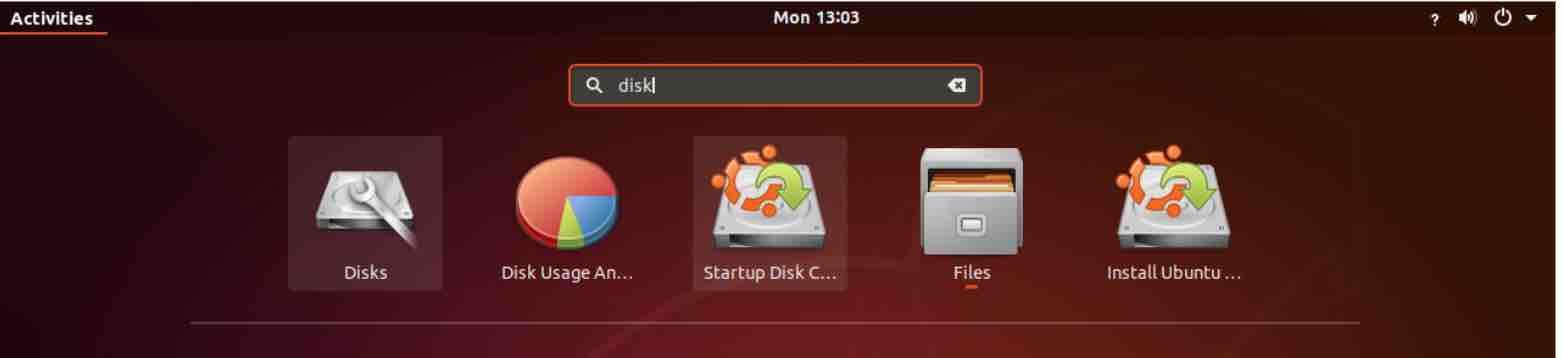
Step 2. Run the Disks program. Just click on the Ubuntu icon and type in “disks” (without the quotes). If you prefer, you can also run it from a terminal using the same command.

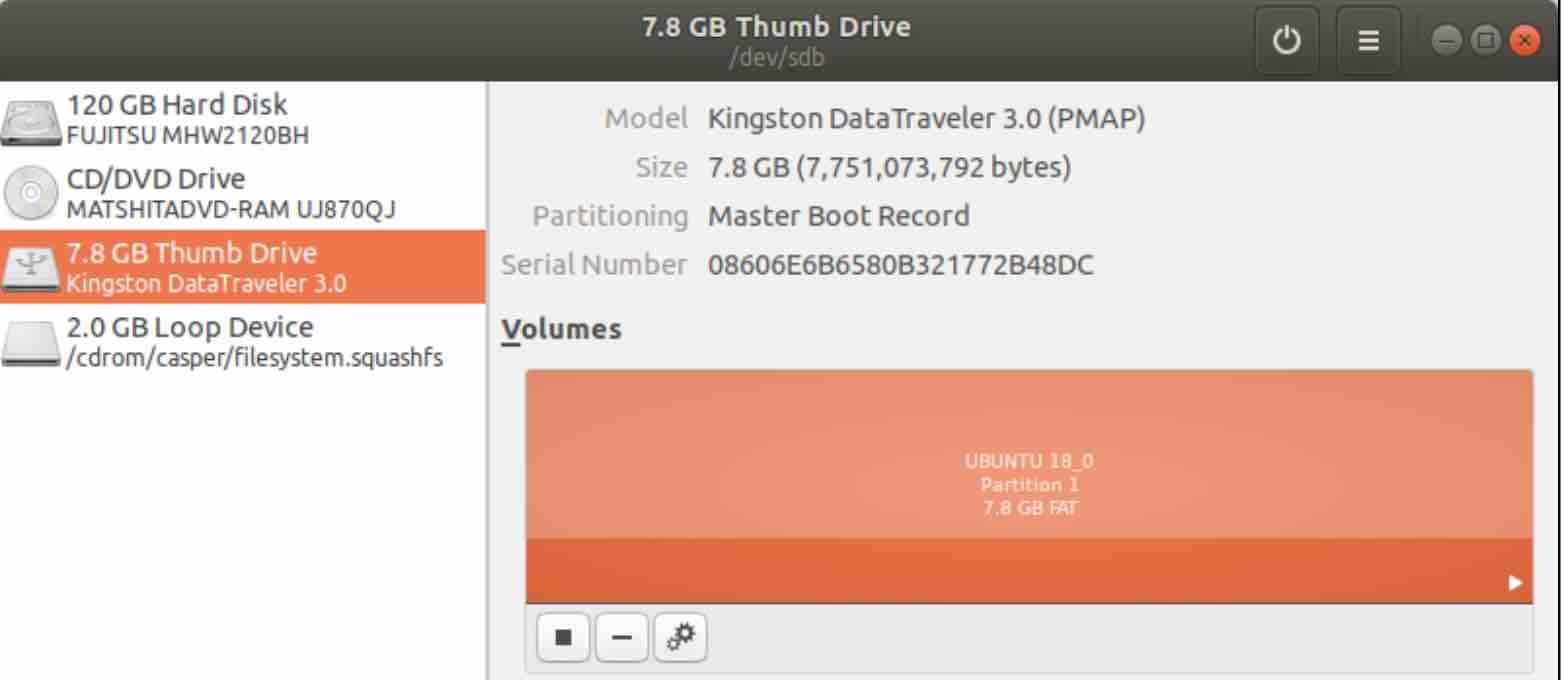
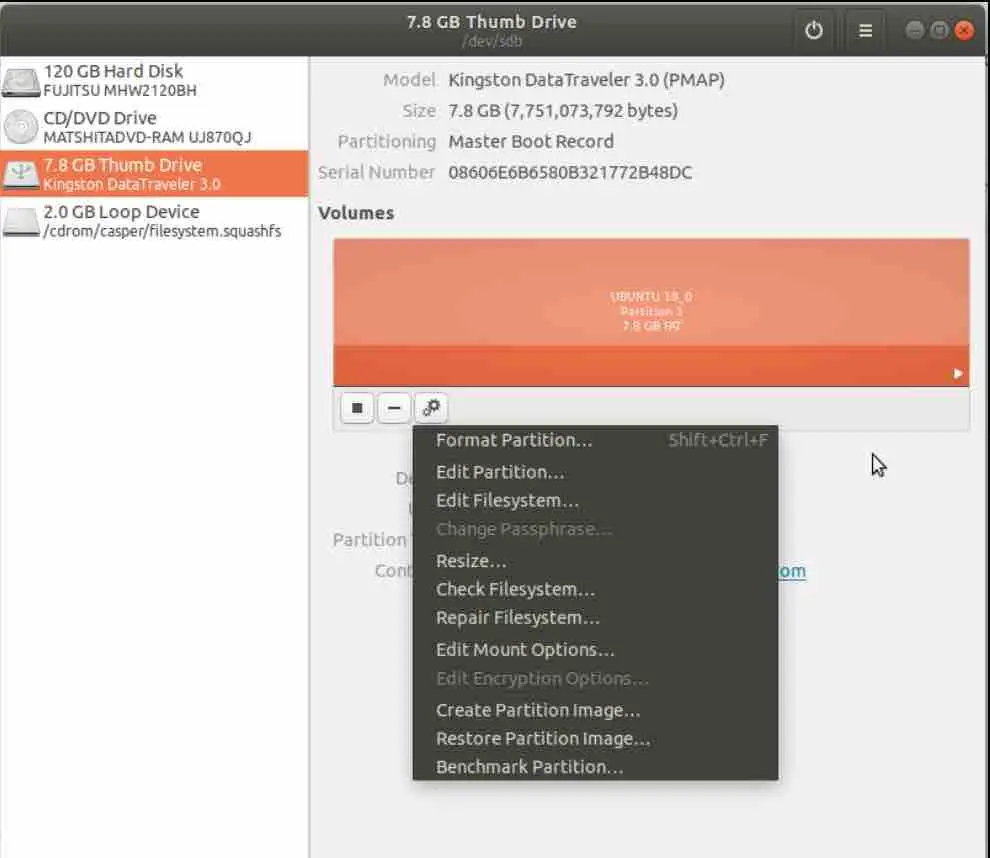
Step 3. In the program window, click on the name of the flash drive. Then, click on the small black frame icon underneath the Volume area to disassemble the unit.

Read: How to speed up Linux

Step 4. Click on the icon with two gears to access the pendrive’s context menu. In that menu, click on the option “Format Partition …”.

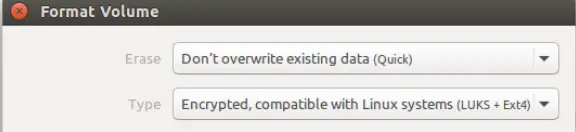
Step 5. In the small window that appears, click on the arrow next to the “Type” field. In the list that appears, click on the option “Encrypted, compatible with Linux systems (LUKS + Ext4) ″.

Read: How to backup and restore your Android device with ADB on Ubuntu

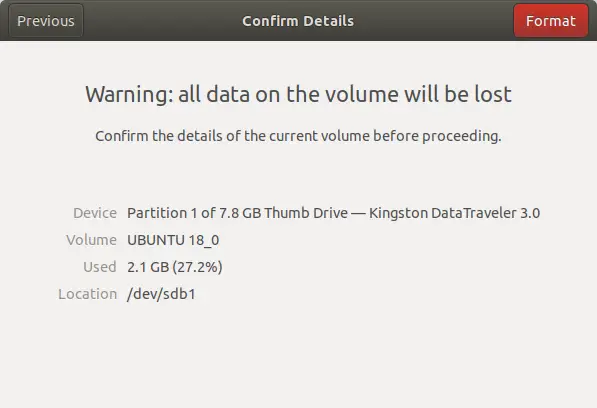
Step 6. Before formatting, the program will ask you if you really want to do this. Confirm by clicking on the “Format” button.

Ready. Now whenever you are going to use the pendrive, you will need to enter the password to access the content.


If you like the content, we would appreciate your support by buying us a coffee. Thank you so much for your visit and support.

Adblock test (Why?)


Original page link

Best Cool Tech Gadgets

Top favorite technology gadgets
Read More
      edit
Published July 20, 2021 by Anonymous with 0 comment

How to Choose a Ringtone Maker For iPhone (+List)

Personalizing your iPhone and setting your own custom ringtone is the dream of every iPhone user because there are not tons of ringtone choices for the consumers to choose from the default settings or the iTunes app. That is why they turn to otherthird-party apps to make their own ringtones with the ringtone maker for iPhone.

In this article, we are going to discuss some of those apps and tell you how you can make your iPhone a custom ringtone with the help of Ringtone maker for iPhone. So without further wasting your time, let us get on with the list of the best ringtone makers for the iPhone.

Image source: imore.com

iRingg

The first ringtone maker app for iPhone available on our list is the Softorino iRingg, a simple ringtone creator app that can be used on Windows and macOS. The application is so easy to use and efficient that it will help you make your own custom ringtone within a few clicks. To show you how easy it is, here is the tutorial on how you can make your own custom ringtone with the help of iRingg.

Read: Best mobile video editing apps

Step 1

The first thing you need to do is download the iRingg software from their website and then follow the on-screen instructions in order to install it on your computer.

Step 2

After installing the app, launch it and search for the song in the Browser tab that you want to set as your new iPhone Ringtone.

Step 3

In this step, you need to edit your track by trimming and specifying a 30 seconds part that you want to set as your custom ringtone. You can also add sound effects such as Fade in or Fade out on your track as well from the Personalize & Edit tab.

Step 4

After you are done making changes to your track, you need to export it to your iPhone; you can do that by clicking on the Export button and selecting the iPhone device. The application will automatically transfer your track to your Sound Settings in the iPhone.

Step 5

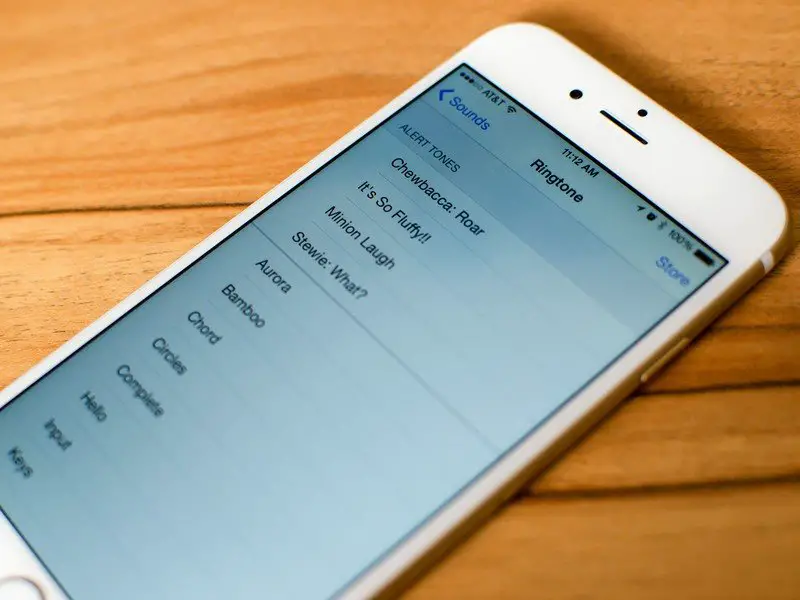
In the last step, you need to go to Settings > Sounds > Ringtones, find the track you just created, click on it, and your track will be set as your new iPhone ringtone.

Pros

  • Easy to use
  • Extremely fast
  • It gives a lot of options to search from
  • Allows you to edit the track
  • App automatically transfer the track to settings

Cons

Softorino YouTube Converter 2

Softorino YouTube Converter 2 is not just a converter, but it also helps the users make ringtones for them. The application is so user-friendly that it allows you to search the song from more than 66 sources and let you download it in just a few seconds. The app features an in-app browser that does all the work for you. To give you a better understanding of how the application works, here is a step-by-step guide:

Read: How to download YouTube videos with VLC Media Player

Step 1

The first and foremost thing you need to do is download the SYC 2 software from their website and then follow the installation wizard to install it on your Windows or Mac.

Step 2

After you are done installing, you need to connect your iPhone to your computer with the help of a standard USB cable, or you can do it wirelessly via WI-Fi. But remember one thing, when you connect wirelessly through Wi-Fi, make sure both phone and computer are set on the same network.

Step 3

Now, go to the app’s in-app browser and search for the song that you want to set your new ringtone. After you have found your song, you need to select the “Ringtone” from the Convert to the button option. The app gives you a choice to download the full track or trim it to 30 seconds; the choice is yours.

Step 4

After selecting the ringtone option, you need to select the device to which you will transfer your track; in this case, it’s the iPhone.

Step 5

Once you are done, click on the Convert & Transfer to iPhone button located on the bottom of the screen. In a few seconds, your song will be transferred to your iPhone.

Step 6

In the last step, you need to go to iPhone Settings > Sound > Ringtone, then select the song you just transferred via SYC 2 app. Now your new ringtone will be set.

Pros

  • User Friendly
  • Allows you to trim the track
  • Converts the ringtones in few seconds
  • It gives you more than 66 sources to download from
  • Very fast

Cons

  • Ringtones get lost when trying to sync

Zedge

Zedge is a platform that allows users to download free ringtones, wallpaper, and other backgrounds for their phones very efficiently. Zedge also has a ringtone maker for users to create custom ringtones; you can download this from the app store. One of the best things about Zedge is that it makes the ringtone appear in the iTunes application on your computer, which you can find from the Recently added section and then get the ringtone on the iPhone via syncing.

Pros

  • Free ringtones
  • Own Ringtone maker
  • Easy to use
  • Extremely fast

Cons

  • Only limited options to download from

Read: How to transfer photos and videos from iPhone to Mac and Windows

Ringtone Maker

This ringtone maker for iPhone lets you easily make your custom ringtone from any song. However, there is a downside to this platform as it does not let you make changes to the tone. The ringtone maker lets you make the ringtone in three steps; first, you need to upload your track, Second, you need to select the duration, last is to select the apple M4R format, and then click Make Ringtone. After you are done, you need to save your track on your computer and then transfer the file via WALTR 2, which is the best software for transferring files from PC to iPhone.

Pros

  • It lets you make a ringtone in simple steps
  • Easy to use
  • Very fast
  • More than seven formats available

Cons

  • No changes can be made on the track

We are hopeful that by now, you have selected one of the ringtone makers for your iPhone from our list. If you are still unsure which ringtone maker for iPhone to choose and want our recommendation, you should download iRingg or SYC 2 as they are easier to use and do not ask much from the users. So, go on, download the software, avail of their one-day trial, and make your own custom ringtone without any hassle.


If you like the content, we would appreciate your support by buying us a coffee. Thank you so much for your visit and support.

Adblock test (Why?)


Original page link

Best Cool Tech Gadgets

Top favorite technology gadgets
Read More
      edit